Most email services cap attachments at around 20–25 MB, and many upload forms (job applications, government portals, schools) allow only 2–10 MB. If your PDF is too big, here is how to shrink it, and what to try when compression alone isn't enough.
First, find out what makes the PDF big
PDF Size BreakdownSee which pages and what content make a PDF heavy, with a page-by-page table. Results show right on the page.Open toolPDFs get large for three main reasons: scanned pages (every page is a big photo), high-resolution images pasted into a document, and embedded fonts. The PDF Size Breakdown tool shows which pages and images take up the space, so you know whether compression will help.
Compress the PDF
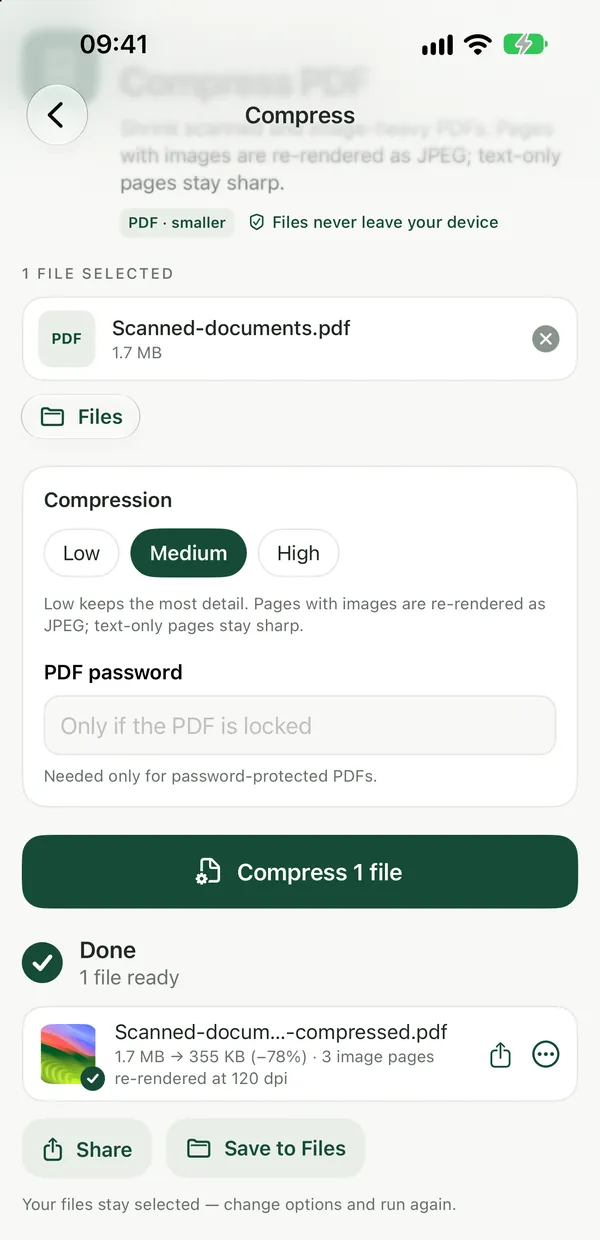
Compress PDFShrink scanned and image-heavy PDFs. Pages are re-rendered as images, so text is no longer selectable.Open tool- Open Compress PDF and drop your file.
- Run it. Each page is re-rendered as an optimized JPEG image.
- Compare the new size with the original and download.
This works best on scanned documents and image-heavy PDFs, which often shrink by 50–90%. The trade-off: because pages become images, text is no longer selectable or searchable. Keep the original if you need to edit or search it.
When compression makes the file bigger
A PDF that is mostly text (a report exported from Word, for example) is already tiny per page. Turning those pages into images can make it larger. In that case, try these instead:
- Remove pages you don't need with Delete PDF Pages, such as blank pages, appendices or duplicate scans.
- Split the PDF into two or three attachments with Split PDF.
- Send only the relevant pages using Extract PDF Pages.
Tips for smaller scans next time
- Scan documents at 150–200 DPI instead of 300–600. That is plenty for reading and printing text.
- Scan in grayscale unless color matters.
- Use your phone's document scanner mode rather than taking photos; it crops and flattens the page.
Is it safe?
Contracts, IDs, medical records and bank statements are exactly the files people need to compress, and exactly the files you shouldn't upload to a random website. Filevale processes the PDF in your browser; it is never sent to a server.
Frequently asked questions
How small can a PDF get?
It depends on the content. A 20-page scan at 300 DPI might go from 30 MB to 3 MB. A text-only PDF is usually already as small as it will get.
Will the quality be good enough to print?
For documents and forms, yes. For photos or artwork meant for professional print, keep the original.
Can I compress a password-protected PDF?
Remove the password first with Unlock PDF (you need to know it), compress, then add it back with Password Protect PDF.