A one-minute 4K clip from a modern phone can easily be several hundred megabytes, far more than email or most chat apps accept. The fix is to compress it: lower the resolution and bitrate to something that still looks great on a phone or laptop screen.
Compress the video in your browser
Compress VideoMake videos smaller (up to 1280p, H.264) without uploading them anywhere.Open tool- Open Compress Video and drop your clip (MP4, MOV, WebM, MKV and more).
- Start the compression. The video is re-encoded as H.264 MP4 at up to 1280p.
- Wait for it to finish (keep the tab open), then download.
It runs with FFmpeg inside your browser, so personal videos never leave your device. A desktop or laptop is much faster than a phone for long clips.
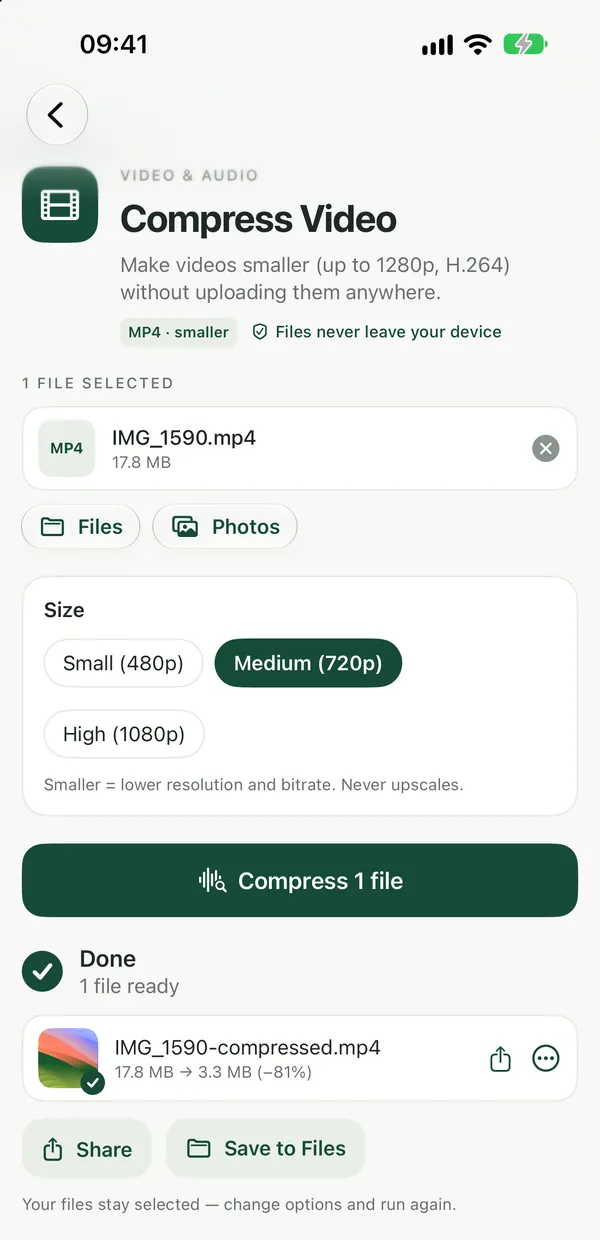
Why this works
Video size is mostly resolution × bitrate × length. Phones record at 4K and very high bitrates so the footage can be edited later. For watching on a screen, 720p–1080p at a sensible bitrate looks almost identical and is many times smaller.
Still too big?
- Trim it. Send only the part that matters; size scales with length.
- Send just the sound. For a voice memo or a song, MP4 to MP3 is a fraction of the size.
- Make a GIF. For a short funny moment, Video to GIF creates a small looping animation that plays everywhere.
On a Mac
QuickTime's File > Export As and Finder's Encode Selected Video Files action can shrink a video without any download; our guide to compressing video on a Mac compares them with the browser tool and explains which to pick for email, Discord or WhatsApp.
iPhone videos that won't play on Windows
iPhones save .mov files, often in HEVC. Many Windows players and websites can't play them. MOV to MP4 converts them to standard H.264 MP4, which plays everywhere.
Frequently asked questions
Will compressing reduce quality?
Some detail is removed, but at 720p–1080p it is hard to see on phones and laptops. Keep the original for editing or archiving.
How long does it take?
Roughly real time or faster on a modern laptop; slower on phones. Longer and higher-resolution clips take longer.
Is there a file size limit?
Files are processed on your device, so very large files depend on its memory. A laptop handles more than a phone.