Visa applications, rental files, invoices for accounting, scanned homework: lots of forms want one PDF, not five. Here is how to merge PDFs in under a minute, and how to fix the page order afterwards.
Merge PDFs in your browser
Merge PDFCombine PDFs into one file, in the order you want. Files never leave your device.Open tool- Open Merge PDF.
- Add your files. You can select several at once or add more in a second step.
- Check the order in the list. Files are combined top to bottom; remove one with ✕ and add it again to move it to the end.
- Click Combine and download the merged PDF.
Everything happens on your device, which makes it suitable for passports, payslips and contracts.
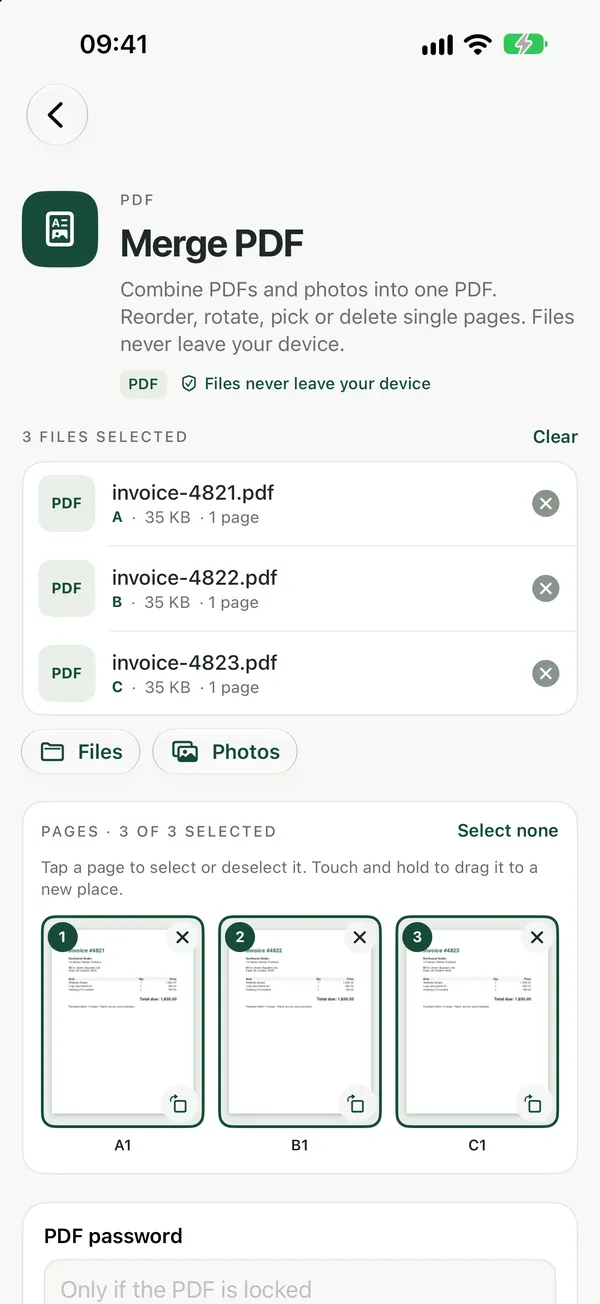
Fix the page order or remove pages
After merging you might want to move a page, drop a blank one or rotate a sideways scan:
- Organize PDF Pages to reorder pages.
- Delete PDF Pages to remove pages.
- Rotate PDF to turn pages the right way up.
Have photos instead of PDFs?
Phone photos of documents can be turned into a PDF first with JPG to PDF (or HEIC to PDF for iPhone photos), then merged with your other PDFs.
Merge PDFs on a Mac without any website
macOS Preview can merge PDFs: open the first file, show the sidebar thumbnails, and drag the other PDFs into it. It works, but it's fiddly with many files. The browser tool is quicker and works the same on Windows and phones. Our step-by-step guide to merging PDFs on a Mac covers Preview, Finder's Create PDF action and how to avoid overwriting your original file.
Merge PDFs on an iPhone or iPad
Open Merge PDF in Safari, tap the drop area and pick the PDFs from Files, then reorder them and save the merged file back to Files. Nothing is uploaded, so it works for bank statements and contracts too. If you merge PDFs on your phone often, the free Filevale iPhone app does the same on-device.
Frequently asked questions
Is there a limit on how many PDFs I can merge?
You can add as many PDFs as your device can handle. Very large files (hundreds of MB) depend on your device's memory, so a laptop handles more than a phone.
Will the merged PDF keep links and text?
Yes. Merging copies the pages as they are, so text stays selectable and the file stays sharp.
Can I merge password-protected PDFs?
Unlock them first with Unlock PDF using their password, then merge.