To convert an MP3 to WAV, drop it into a browser converter, click Convert and download the .wav file; it takes a few seconds for a short clip. If your "MP" file is actually an M4A or an MP4 video, there is one extra choice or step, covered below. This works the same on Windows, Mac, iPhone and Android.
Which "MP" file do you have?
Look at the end of the file name:
.mp3is ordinary compressed audio. Use the MP3 to WAV converter in the next section..m4ais AAC audio in an MP4 container, the format of iPhone voice memos and iTunes. Use the Audio Converter..mp4is usually a video. Pull the sound out first, then convert it.
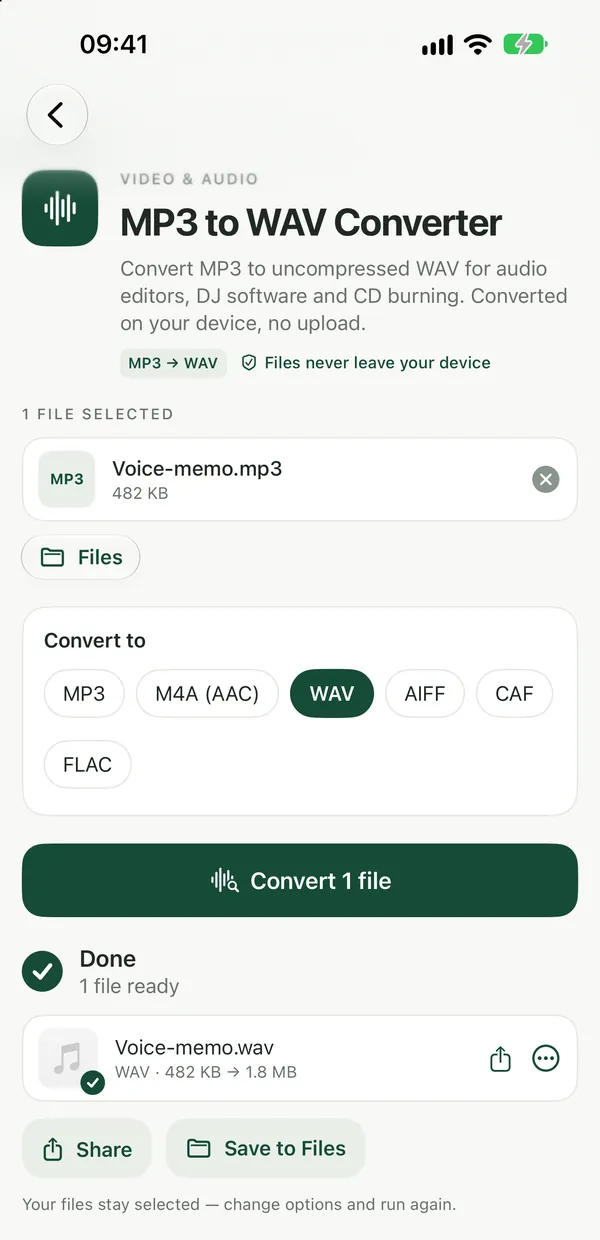
Convert MP3 to WAV
MP3 to WAV ConverterConvert MP3 to uncompressed WAV for audio editors, DJ software and CD burning. Private conversion in your browser, no upload.Open tool- Open MP3 to WAV and drop your MP3 on the page, or click to browse. You can add several at once.
- Adjust the quality if you like, then click Convert. Everything happens on your device.
- Download the WAV file. To try different settings, change the options and run it again on the same file.
The same page can also save an MP3 as M4A or OGG if the app you are feeding turns out to want one of those instead. Converting a batch gives you the results as one ZIP.
Convert M4A and other audio to WAV
Audio ConverterConvert audio between MP3, M4A, WAV, FLAC, AIFF, CAF and OGG in your browser. Also reads Opus, AC-3, AU and WMA files.Open toolThe Audio Converter reads MP3, WAV, M4A, AAC, OGG, OGA, OPUS, FLAC, AIFF, AIF, CAF, AC3, AU and WMA files. Drop your file, pick wav as the output format, adjust the quality if you like and click Convert. It can also write MP3, M4A, FLAC, AIFF, CAF and OGG, so it is the one to use when you are not sure what you were sent.
Get WAV from an MP4 video
Video to MP3 ConverterSave the sound of any video (MP4, MOV, WebM, MKV, AVI) as an MP3 file. Converted on your device in the browser, nothing is uploaded.Open toolVideo to MP3 pulls the sound out of a video as an MP3. Run your MP4 through it, then put the MP3 through MP3 to WAV. There is no single step from MP4 video straight to WAV on Filevale, so this two-step route is the honest way to do it. If you only need the audio for listening, the MP3 alone is enough; this guide on extracting audio from a video goes into more detail.
What to expect from the WAV file
WAV is uncompressed audio: full quality, but about 10 MB per minute of stereo sound. A three-minute song therefore turns into a WAV of roughly 30 MB, many times bigger than the MP3.
Converting does not bring back detail. MP3 is lossy, so the sound lost when the MP3 was made stays lost; the WAV is simply an uncompressed copy of what the MP3 contains. That is exactly what editors and DJ software need, but it is not an upgrade in sound.
If you want lossless audio at a smaller size, Audio to FLAC saves WAV, AIFF and similar files as FLAC, about half the size of WAV. To go back the other way when the WAV is too big to send, use WAV to MP3.
The built-in option on a Mac
The Music app on a Mac can make WAV copies too. In Music → Settings → Files → Import Settings, choose WAV Encoder, then select a song in your library and use File → Convert → Create WAV Version. For loose files, a phone or a Windows PC, the browser converter is quicker.
Privacy and accounts
The converters run in your browser using a WebAssembly build of FFmpeg, so your recordings are never uploaded. The first time, the converter engine (about 30 MB) is downloaded once and then cached. The tools are free with no watermarks, and no sign-up is needed to download. More audio and video tools are on the video and audio tools page.
Frequently asked questions
Does converting MP3 to WAV improve the sound?
No. The WAV keeps exactly what is in the MP3, including the losses from the original compression, and just stores it uncompressed. For better sound you need a better source, such as the original recording or a lossless file.
Can I convert MP3 to WAV on my iPhone or Android phone?
Yes. The converter works in any modern browser, including Safari and Chrome, on iPhone, iPad, Android, Mac, Windows and Chromebook, with nothing to install. Your phone does the work, so a short clip usually takes seconds.
Why is my WAV file so much bigger than the MP3?
WAV stores audio uncompressed, about 10 MB per minute of stereo sound, while MP3 throws away data to stay small. The bigger size is normal and is the reason editing and DJ programs like WAV.