To tar and gzip files, run tar -czvf archive.tar.gz followed by the files or folder you want to pack, or add the files to a browser tool that builds the .tar.gz for you. Both give you one compressed archive that Linux servers, developer tools and most Mac and Linux users expect. This guide covers the command line on Mac, Linux and Windows, the browser way for phones and anyone who would rather not open a terminal, and how to check the result.
What tar and gzip each do
A .tar.gz file is two steps in one. TAR bundles many files and folders into a single file without compressing them. gzip then compresses that bundle so it is smaller. The result is called TAR.GZ or TGZ, and it is the standard archive on Linux servers and for source code. You will see both .tar.gz and .tgz endings; they mean the same thing.
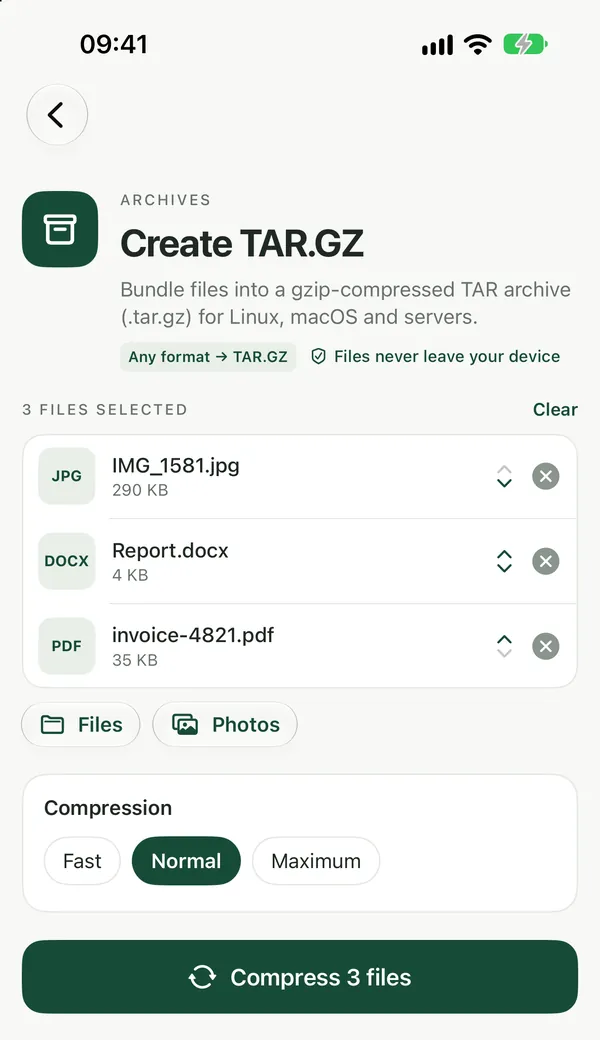
Create a TAR.GZ in your browser
Create TAR.GZBundle files into a .tar.gz (gzip-compressed TAR) archive in your browser, the standard archive format on Linux and macOS servers.Open tool- Open Create TAR.GZ and choose the files you want to pack: drop them on the page or click to browse. Any type of file works, and you can add several at once.
- Click Create TAR.GZ from N files. Everything happens on your device; the files are not uploaded.
- Download the TAR.GZ file. If you want a different result, change the options and run again on the same files.
This works in any modern browser on iPhone, iPad, Android, Mac, Windows and Chromebook, with nothing to install. The tool is free with no watermarks, and no sign-up is needed to download.
Tar and gzip on Mac or Linux
Open Terminal, go to the folder that holds your files, and run:
tar -czvf archive.tar.gz myfolder
The letters mean: c create a new archive, z compress it with gzip, v list each file as it is added, and f write to the file name that follows. You can list several files or folders instead of one, for example tar -czvf archive.tar.gz notes.txt photos report.pdf. The v is optional; leave it out for a quieter run.
To check what is inside without unpacking it, use tar -tzvf archive.tar.gz. To unpack it, use tar -xzvf archive.tar.gz.
Tar and gzip on Windows
Recent versions of Windows 10 and Windows 11 include a tar command. Open Command Prompt or PowerShell in the folder with your files and run the same command as on Mac or Linux: tar -czvf archive.tar.gz myfolder. If your version of Windows doesn't have it, or you are on a phone, use the browser tool above.
Check the archive before you send it
Extract TAR / TAR.GZUnpack .tar, .tar.gz, .tgz, .tar.bz2 and .tar.xz archives, or single .gz and .xz files, right in your browser. Browse the folders and pick files.Open toolIt is worth opening the finished archive once to make sure the right files are in it. Add the .tar.gz to Extract TAR / TAR.GZ and click Open: you see its folders and files right away, and you can tick files to download them one by one or together as a ZIP. The same tool opens .tar, .tgz, .tar.bz2 and .tar.xz archives. If you are not sure what kind of archive you have, Extract Archive handles ZIP, RAR, 7Z and TAR formats in one place. For more on opening archives, see how to open RAR, 7Z and ZIP files.
TAR.GZ or ZIP?
Pick TAR.GZ when the files are going to a Linux server, a developer, or a tool that asks for it: it keeps Unix file names and is what Linux tools and many developer workflows expect. Pick ZIP when the person receiving the files uses Windows or a phone, because ZIP is easier for them to open. Create ZIP packs files into a ZIP the same way. More archive tools are on the archive tools page.
Frequently asked questions
What is the difference between .tar, .gz and .tar.gz?
A .tar file bundles many files into one without compressing them. A .gz file is a single file compressed with gzip. A .tar.gz (or .tgz) is a TAR bundle that has then been compressed with gzip, so it holds many files and is smaller than the plain TAR.
Can I make a .tar.gz on my iPhone or Android phone?
Phones don't come with a tar command, but Create TAR.GZ runs in Safari, Chrome and other modern browsers on iPhone, iPad and Android. Pick the files from your phone, create the archive and save it back to your device.
Are my files uploaded when I create a TAR.GZ in the browser?
No. Create TAR.GZ runs entirely in your browser, so the files never leave your device. That makes it a reasonable choice for private or confidential files you need to pack before sending.