To decrease file size, you re-save the file in a more efficient form: photos at a lower quality, videos at a lower bitrate, audio as MP3, documents as a compressed PDF. Filevale's Reduce File Size tool does this for most common file types in one place, right in your browser. Here is how it works and what to do when a file won't shrink.
Decrease file size in your browser
Reduce File SizeMake any file smaller: photos, PDFs, videos, audio, Word and Excel documents (as compressed PDF) and archives (re-packed ZIP). Runs in your browser.Open tool- Open Reduce File Size and drop your file on the page, or click to browse. You can add several at once.
- Adjust the quality if you like, then click Reduce. Everything happens on your device.
- Download the smaller file. If it is still too big, change the options and run it again on the same file.
It accepts JPG, PNG, WEBP, HEIC, PDF, MP4, MOV, M4V, WEBM, MP3, WAV, M4A, FLAC, AAC, OGG, DOCX, DOC, XLSX, XLS, PPTX, RTF, ZIP, RAR, 7Z, TAR, GZ and TAR.GZ files. Your original is never touched: you get a new, smaller copy. The files are processed in the browser and are not uploaded. The tool is free with no watermarks, and no sign-up is needed to download.
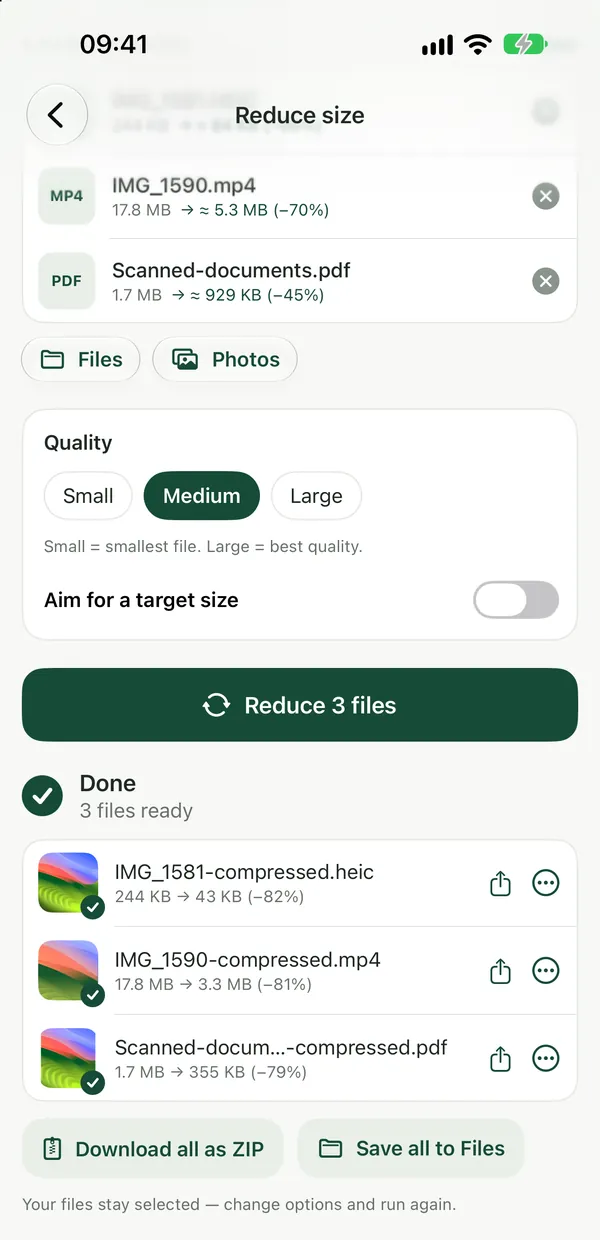
What happens to each type of file
- Photos are re-encoded as JPEG or WebP at the quality you pick. A photo saved as PNG is several times larger than the same photo as JPG, so PNG photos usually shrink a lot.
- PDFs have their pages recompressed.
- Videos become H.264 at a lower bitrate and up to 1280 px wide.
- Audio becomes MP3.
- Word, Excel and PowerPoint files become a compressed PDF, so the result is no longer an editable document.
- ZIP, RAR, 7Z and TAR archives are re-packed as a ZIP with maximum compression.
For a single file type, there are focused tools: PNG to JPG for screenshots and graphics you want to send as photos, Compress Video for clips, Compress Audio for recordings and Compress PDF for documents. For a deeper look at videos, see how to reduce video file size.
Find out what makes a PDF heavy
PDF Size BreakdownSee which pages and what content make a PDF heavy, with a page-by-page table. Results show right on the page.Open toolBefore you compress a big PDF, check where the weight is. PDF Size Breakdown shows a page-by-page table of which pages contain images and drawing, right on the page. Click Analyze, then read, copy or save the report. Nothing in the PDF is changed. If a handful of scanned pages carry most of the size, removing them with Delete PDF Pages may help more than compression.
Keep audio lossless but smaller
Audio to FLAC ConverterConvert WAV, AIFF, CAF and other audio to lossless FLAC (about half the size of WAV), or to WAV, AIFF and CAF. Runs in your browser.Open toolMP3 is small but lossy. If you have WAV, AIFF or CAF recordings and want to keep every detail, convert them to FLAC instead: lossless FLAC is about half the size of WAV. Don't do this with MP3 or OGG files, though. FLAC keeps exactly what goes in, so a lossy source keeps its losses and just becomes a bigger file.
When a file won't get smaller
Some files are already as small as they can be, such as a well-compressed JPEG or a ZIP full of photos. Reduce File Size tells you so and keeps the original instead of handing you a bigger file. In that case:
- Lower the quality setting and run it again.
- Split a long PDF into parts with Split PDF, or send only the pages that matter.
- For a hard limit on an upload form or email, the guide on getting a file under a size limit walks through the options.
Filevale can't resize or crop images to smaller dimensions, and it can't trim or cut videos. For those, use the photo editor built into your phone or computer. Zipping a folder with your operating system's built-in compression (on Windows, Send to → Compressed (zipped) folder; on a Mac, right-click and choose Compress) bundles files into one attachment, but it barely shrinks photos or videos that are already compressed.
Frequently asked questions
Does decreasing file size lower the quality?
For photos, video and audio, yes, a little: they are re-encoded at a lower quality or bitrate. At moderate settings the difference is hard to notice for sharing, and your original file is never changed, so you can always go back to it.
Why did my Word file turn into a PDF?
Reduce File Size makes Word, Excel and PowerPoint files smaller by turning them into a compressed PDF. That is good for sending and reading, but the result is not editable, so keep the original if you still need to make changes.
Can I decrease the size of many files at once?
Yes. You can add several files at once, and batch processing and ZIP downloads are included for free. For more on shrinking a mix of file types, see how to shrink file size.