To get a file under a size limit, make a smaller copy of it: drop it into Reduce File Size, lower the quality, and check the new size against the limit. If it is still too big, cut the content instead, by removing pages, splitting the file or sending a shorter clip. This works for a job portal that says "max 2 MB" or an email that bounces.
Check the limit and your file's real size
Before you change anything, compare two numbers: the limit the site or email service states, and the size of your file. On Windows, right-click the file and choose Properties. On a Mac, select it and choose File → Get Info. Watch the units: 1 MB is about 1,000 KB, so a "500 KB" limit is half a megabyte, not five. Many email services cap attachments at around 20–25 MB, while upload forms often allow far less.
Make the file smaller in your browser
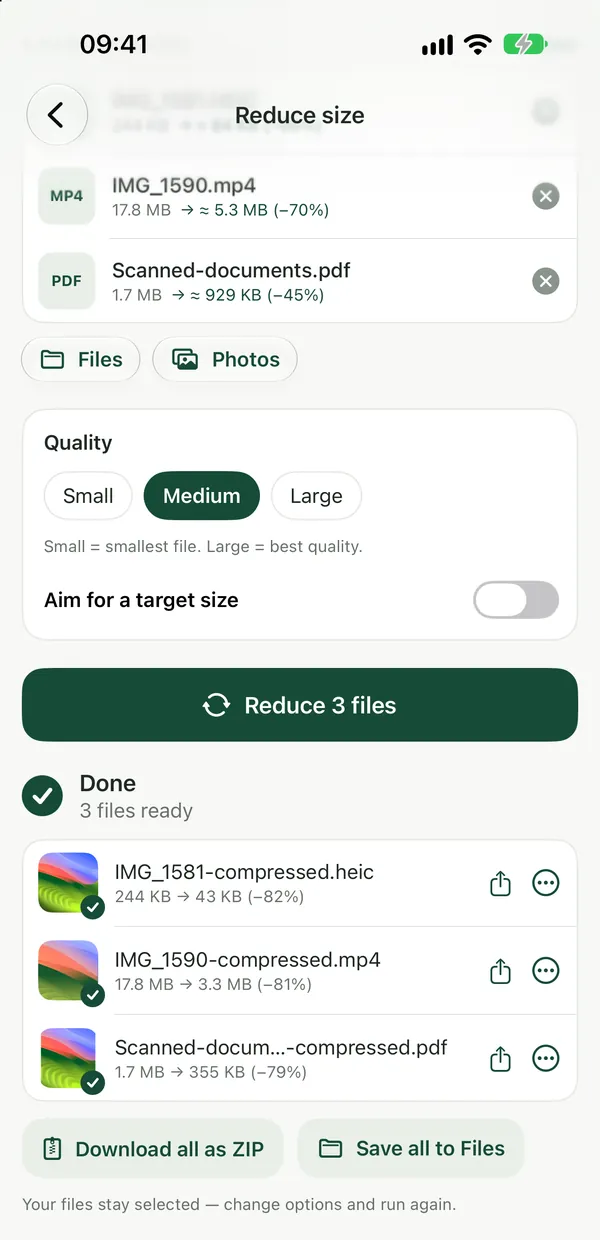
Reduce File SizeMake any file smaller: photos, PDFs, videos, audio, Word and Excel documents (as compressed PDF) and archives (re-packed ZIP). Runs in your browser.Open tool- Open Reduce File Size and drop your file on the page, or click to browse. You can add several at once.
- Adjust the quality if you like, then click Reduce. Everything happens on your device.
- Download the smaller copy and check its size against the limit.
- Still over? Change the options and run it again on the same file.
It handles photos, PDFs, videos, audio, Word, Excel and PowerPoint files, and archives. There is no box to type a target size, so the way to hit a limit is to lower the quality step by step until the copy fits.
Each type is shrunk differently. Photos are re-encoded as JPEG or WebP at the quality you pick. PDFs have their pages recompressed. Videos become H.264 at a lower bitrate and up to 1280 px wide, and audio becomes MP3. Word, Excel and PowerPoint files become a compressed PDF, so check that the form accepts PDF before you use that route. Archives are re-packed as a ZIP with maximum compression.
For one type at a time, the dedicated tools do the same job: Compress PDF, Compress Video and Compress Audio.
When the file won't get small enough
PDF Size BreakdownSee which pages and what content make a PDF heavy, with a page-by-page table. Results show right on the page.Open toolSome files are already as small as they can be, such as a well-compressed JPEG or a ZIP of photos. Reduce File Size tells you so and keeps the original instead of handing you a bigger file. At that point you need to send less, not compress harder.
For a PDF, run PDF Size Breakdown first. It shows a page-by-page table of which pages contain images and drawing, so you can see where the weight is. Then:
- Remove pages the form doesn't need with Delete PDF Pages.
- Send only the relevant pages with Extract PDF Pages.
- Break a long document into one file per page with Split PDF, then combine the parts you need with Merge PDF.
Filevale can't resize or crop images, and it can't trim videos. If a photo is huge because of its pixel dimensions, or a video is simply too long, use your phone's or computer's built-in editor to crop or trim it, then run the result through Reduce File Size.
Built-in options on your device
On a Mac, Preview can save a smaller PDF: choose File → Export and set Quartz Filter to Reduce File Size. On Windows, right-click files and choose Send to → Compressed (zipped) folder to pack them into one ZIP. When you attach photos to an email in the iPhone Mail app, it often offers smaller image sizes before sending.
For more detail on specific cases, see how to compress a PDF for email and how to reduce video file size.
Frequently asked questions
Can I set an exact target size, like 1 MB?
No. Reduce File Size has a quality setting rather than a target-size box. Start with a moderate quality, check the result, and run it again on the same file with a lower setting if it is still over the limit.
Are my files uploaded when I reduce them?
No. Reduce File Size runs entirely in your browser, so your files never leave your device. That makes it suitable for ID scans, contracts and other private documents you need to fit into an upload form. Using the tool is free, and no sign-up is needed to download.
Why did my Word document turn into a PDF?
Reduce File Size makes Word, Excel and PowerPoint files smaller by turning them into a compressed PDF. If the form only accepts DOCX, remove large images from the document in Word instead, or split the content into parts.