Quick answer: Adobe's free online Acrobat tools are the official tools from the company that created PDF, and they process your file on Adobe's servers with daily limits before they ask you to upgrade. Filevale runs the common PDF jobs in your browser, so the file is not uploaded, and it needs no account. Choose Filevale for quick, private jobs. Choose Acrobat when you need true PDF text editing, OCR, redaction, comparison or enterprise features. Adobe facts below are as of November 2026, from Adobe's own pages (see Sources).
Where your file goes
- Adobe Acrobat online: the Compress PDF page says your file is securely handled by Adobe servers and deleted unless you sign in to save it. Signed-in users can store files online and open them on any device. The desktop app is different: Adobe says files stay on your local device rather than an external server.
- Filevale: the PDF engine is loaded into your browser tab and works on your device. Nothing is uploaded, and there is no cloud copy to manage.
Adobe's privacy policy describes cloud content generally as content uploaded to its servers or created with its cloud services, and says it may be scanned automatically for illegal or abusive material. That is standard for a cloud service and worth knowing if you are handling confidential paperwork.
Side by side
Free usage
- Adobe: its Acrobat online page invites you to try 25+ tools for free. The PDF to Word page says the tool is free with daily conversion limits, without stating the number, and offers a 7-day Acrobat Pro trial for more. The compressor page says it can handle files up to 2 GB.
- Filevale: no daily counter. The practical limit is your device's memory.
Sign-in
- Adobe: its pages are not consistent on this. The FAQs say no sign-up is needed for basic use, while other text says you may be asked to log in again when you use a tool repeatedly, and saving a file needs an account.
- Filevale: no sign-up, no watermarks.
Paid plans
- Adobe: the Acrobat pricing page lists Standard, Pro and Studio. Standard covers editing text and images, converting to and from PDF, organizing pages, forms, e-signatures and password protection. Pro adds 70+ advanced tools, PDF comparison, redaction and turning scans into editable PDFs. Studio adds an AI Assistant, PDF Spaces and Adobe Express tools. All three include desktop software, browser tools, the Acrobat Reader mobile app and the Adobe Scan app. Prices on the page we saw were shown in a regional currency, so check your own storefront on Adobe's pricing page.
- Filevale: no paid tier on the web. The tools are free to use.
Apps
- Adobe: desktop apps, Acrobat Reader mobile and Adobe Scan.
- Filevale: browser, plus Filevale: File Converter & QR for iPhone and iPad with on-device scan to PDF and text recognition. A Mac app is on the way.
When Adobe Acrobat is the better choice
- Real PDF editing. Editing existing text and images, in place, is a core Acrobat feature. Filevale does not edit existing text.
- OCR and scan cleanup. Scan-to-editable conversion is listed under Pro and Studio, and Adobe Scan uses OCR to make scans searchable.
- Redaction and comparison. Pro lists redaction and PDF version comparison. Filevale does not offer them.
- Accuracy of Adobe's own format. For complex forms, accessibility tagging or print-production PDFs, the creator of the format has the deepest support.
- Workplace standardization. If your organization already runs Adobe licenses and sharing for review, staying inside Acrobat is simpler.
- Large files. The compressor handles up to 2 GB on a server.
When Filevale is the better choice
- You want to merge, split, compress or sign a PDF in seconds with no login prompt.
- The file is sensitive, and you would rather it never reach a cloud service.
- You hit a daily limit and need one more job today.
- You do not want to install a desktop app or start a trial for a simple task.
Do the same jobs in Filevale
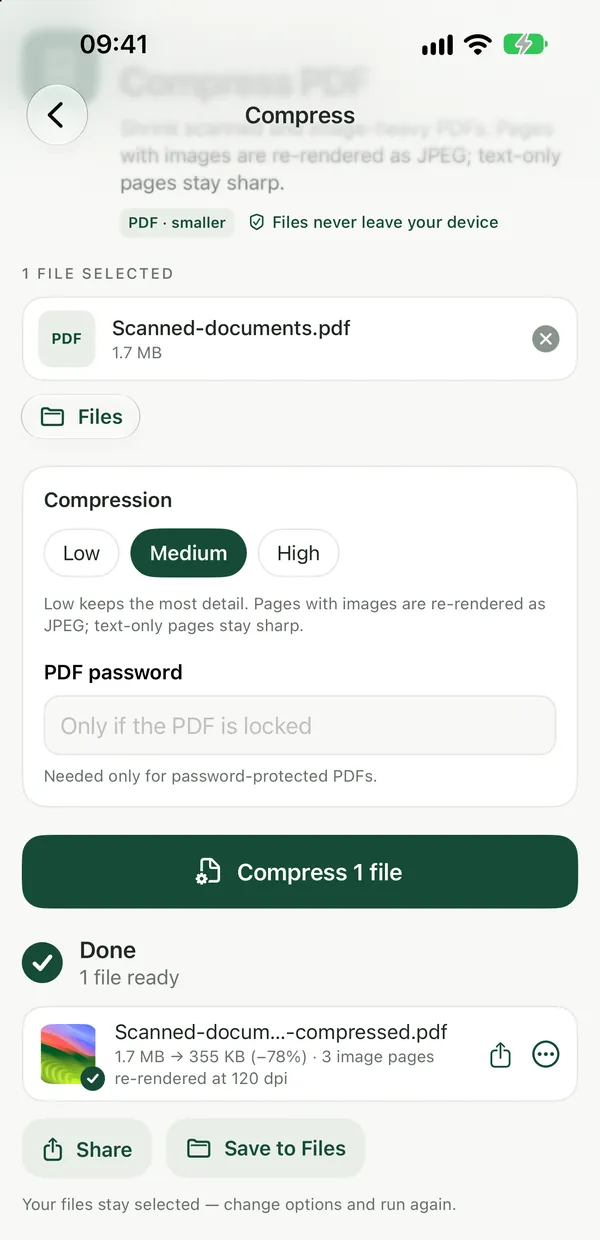
Compress PDFShrink scanned and image-heavy PDFs. Pages are re-rendered as images, so text is no longer selectable.Open tool- Open Compress PDF and drop your file.
- Pick a level and run it in your browser.
- Check the size against your limit and download.
Merge PDF combines files and lets you reorder pages before you download.
Sign PDFAdd your signature to a PDF: draw it, type it or upload a picture, place and resize it on any page, add a date, then download the signed PDF.Open toolSign PDF places a drawn, typed or image signature on the page, locally. It is a visual signature, not a certificate-based digital signature. For that, see Adding a Digital Signature to a PDF.
A simple way to choose
- Private, quick, no account: Filevale.
- Edit text in a PDF, OCR, redact or compare: Acrobat Pro or Studio.
- Already inside an Adobe license: stay with Acrobat.
- Everything on an iPhone, offline: the Filevale app.
Related: Filevale vs iLovePDF and Filevale vs Smallpdf.
Sources
Checked in November 2026. Adobe pages vary by region and change often, so confirm on Adobe's site.
- Adobe Acrobat online tools: 25+ tools to try for free.
- Adobe Compress PDF: 2 GB limit, processing on Adobe servers, deletion unless signed in, desktop app keeps files local.
- Adobe PDF to Word: daily conversion limits, 7-day Acrobat Pro trial, sign-in behavior.
- Adobe Acrobat plans: Standard, Pro and Studio features and included apps.
- Adobe privacy policy: cloud content stored on Adobe's servers.
Frequently asked questions
Does Adobe Acrobat online upload my file?
Yes. Its online tools process files on Adobe servers, and the Compress PDF page says files are deleted unless you sign in to save them. The Acrobat desktop app keeps files on your device. Filevale's web tools never upload your file.
Are Adobe's online PDF tools really free?
Adobe says you can try 25+ tools for free, with daily limits that it does not specify on the pages we read, and a 7-day Acrobat Pro trial for more. Filevale's tools are free to use with no daily counter.
Can Filevale edit a PDF like Acrobat?
No. Filevale handles merging, splitting, rotating, cropping, signing, stamping, watermarking, compressing and converting. It does not edit existing text or images in place.
Is Filevale as accurate as Adobe's PDF to Word?
For clean digital documents it rebuilds text, headings and lists, but not images or exact layout. Adobe's converter and its OCR options will usually do better on complex or scanned files.
Do I need an account for Filevale?
No account, no sign-in and no watermarks.