Quick answer: iLovePDF is a large, polished set of PDF tools that uploads your file to its servers, processes it there and deletes it afterwards. Filevale runs the same everyday jobs (merge, split, compress, sign, convert) inside your browser tab, so the file is never uploaded, and it needs no account. Choose Filevale when the document is private or you just want to finish without a sign-up. Choose iLovePDF when you need OCR, large Office conversions, workflows or team features. Facts about iLovePDF below are as of November 2026 and come from its own pages, linked under Sources.
The one difference that matters: where the file goes
Everything else on this page follows from this.
- iLovePDF: the web tools process files on iLovePDF's servers. Its terms say processed files are deleted from its servers within two hours of processing, and they remain only as long as the download link is available.
- Filevale: the PDF engine (pdf.js, pdf-lib and qpdf compiled to WebAssembly) is loaded into your tab and does the work on your device. Nothing is uploaded, so there is no retention period to rely on.
Two hours is a short window, and a reputable service deleting on schedule is a perfectly reasonable risk for most files. The question is whether a copy should exist outside your device at all. For a lease, payslip, medical form or ID scan, many people would rather it did not.
Feature by feature
Core PDF tools
- Filevale: Merge PDF, Split PDF, Compress PDF, Rotate PDF, Sign PDF, Unlock PDF, Password Protect PDF, page extraction, watermarks, metadata removal and more.
- iLovePDF: the same core set plus Redact, Compare, PDF Forms, PDF/A conversion, OCR, page numbers, AI Summarizer, Translate and PDF to Markdown, according to its tool menu.
Converting to and from Office
- Filevale: PDF to Word, PDF to Excel, Word to PDF and others run locally. PDF to Word rebuilds text, headings and lists; images and exact layout are not preserved.
- iLovePDF: offers PDF to and from Word, Excel and PowerPoint, with OCR-based versions marked as Premium-only on its pricing page.
Free-plan limits
- Filevale: no daily task counter and no file-size cap set by us. The practical limit is your device's memory.
- iLovePDF: the free plan lists a task allowance and a maximum file size per tool. On its pricing page, for example, Merge PDF shows 25 tasks and 100 MB, Compress PDF shows 2 tasks and 200 MB, and Word to PDF and PDF to Word show 1 task and 15 MB each.
Account and watermarks
- Filevale: no sign-up, no watermarks.
- iLovePDF: its pricing page shows Login and Sign up and does not say which free tools need an account, so we are not claiming either way.
Apps
- Filevale: works in any modern browser, plus Filevale: File Converter & QR for iPhone and iPad, which includes scan to PDF with on-device text recognition. A Mac app is on the way.
- iLovePDF: web, a desktop app for Mac and Windows, and a mobile app for iOS and Android. Its pricing page lists desktop and mobile as included with Premium, and the Free plan as web only.
Pricing, honestly
iLovePDF's pricing page lists three tiers as of November 2026: a Free plan with limited tools and limited batch processing, Premium at 7 US$ per month billed monthly or 4 US$ per month billed annually (48 US$), and a custom Business plan for 25 or more users. Premium adds all tools, batch processing without limits, desktop and mobile apps, 2,000 AI credits and larger per-task file sizes (up to 4 GB for most tools).
Filevale's web tools are free to use. If you process dozens of files a day or need the premium features above, a paid iLovePDF plan may be worth its price. If you do a few jobs a month, you may never need one.
When iLovePDF is the better choice
Being fair matters more than winning a comparison:
- OCR on scanned documents. iLovePDF has an OCR PDF tool, and its advanced OCR is a Premium feature. Filevale's browser tools do not do text recognition. Our iPhone app can turn a scan into a searchable PDF on the device, but if you work at a desk, iLovePDF is the more direct route.
- Heavy or unusual conversions. A server has far more memory than an old phone. For a 3 GB PDF or a conversion that a browser engine cannot handle, a server-side tool may succeed where a local one runs out of memory.
- Workflows, integrations and teams. iLovePDF lists custom workflows, Zapier, Make and WordPress integrations through iLoveAPI, and Business features such as single sign-on. Filevale has none of these.
When Filevale is the better choice
- The document is sensitive and you would rather not send it to any third party, however briefly.
- You are on a shared or work computer and do not want to create an account.
- You want a quick merge, split, compress or signature without hitting a task limit.
- You are on iPhone or iPad and want everything on the device, including in Airplane Mode.
Do the same job in Filevale
Two jobs people most often take to iLovePDF.
Merge PDFCombine PDFs into one file, in the order you want. Files never leave your device.Open tool- Open Merge PDF and add your files.
- Reorder them, then merge.
- Download the combined PDF. It was assembled in your browser.
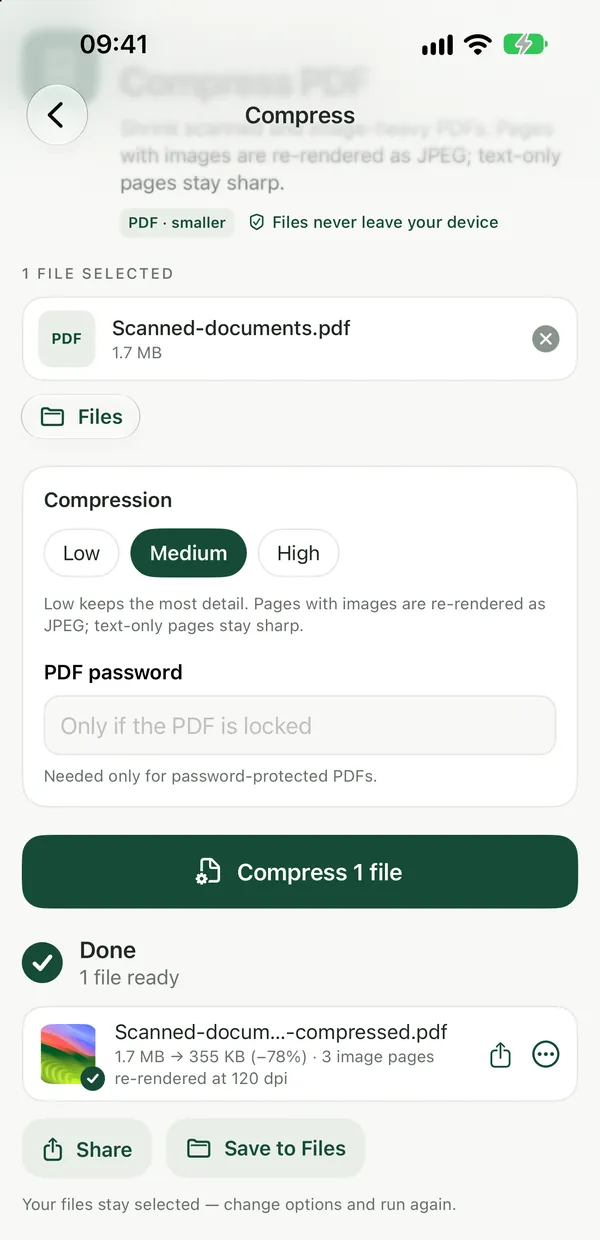
To shrink a PDF for email or an upload form, drop it into Compress PDF, pick a level and compare the new size with your limit. For a longer walkthrough, see How to Compress a PDF for Email.
See also Private iLovePDF and Smallpdf Alternative and Filevale vs Smallpdf.
Sources
Checked in November 2026. Pages can change, so confirm current numbers on the provider's site before you decide.
- iLovePDF pricing: plans, prices, free-tier task and size limits, Premium-only features, apps.
- iLovePDF terms and conditions: deletion of processed files within two hours.
- iLovePDF Desktop and iLovePDF home: desktop and mobile availability, ISO 27001 badge, iLoveAPI integrations.
Frequently asked questions
Does iLovePDF upload my files?
Its web tools process files on its servers, and its terms say processed files are deleted from those servers within two hours. Its desktop app can work on files locally, according to its own description, though some desktop tools still use its servers. Filevale's web tools never upload your file.
Is Filevale really free compared with iLovePDF?
Filevale's tools are free to use, with no watermarks and no sign-up. iLovePDF has a free plan with per-tool limits listed on its pricing page and a paid Premium plan that lifts them.
Can Filevale do OCR like iLovePDF?
Not in the browser. The Filevale iPhone and iPad app can scan a document into a searchable PDF using on-device text recognition. For OCR on a desktop computer today, iLovePDF is the more complete option.
Which is better for converting PDF to Word?
For clean text documents, Filevale's local PDF to Word rebuilds paragraphs, headings and lists, but does not keep images or exact layout. For layout-heavy files or scans, a server-based tool with OCR such as iLovePDF Premium may give a closer result.
Will my files have a watermark?
Filevale never adds one. Check the current terms of any tool you use if watermarks matter to you.