Quick answer: Smallpdf is a well-known, Swiss-built PDF suite that uploads your file to its servers, processes it and deletes it later, with a free tier that limits how many documents you can download per day. Filevale does the everyday PDF jobs inside your browser, so nothing is uploaded, and it has no daily counter and needs no account. Pick Filevale for private documents and quick jobs without limits. Pick Smallpdf when you need OCR, text editing in a PDF, or its mobile, desktop and team features. Smallpdf facts below are as of November 2026, taken from its own pages (see Sources).
Where your file goes
- Smallpdf: it is an upload-based service. Its Compress PDF page states that files are secured with TLS encryption, that the service complies with GDPR and is ISO/IEC 27001-certified, and that it automatically deletes files after one hour. Its privacy policy adds detail: if you use a signed-in account, files are deleted within one hour unless you save them to your file storage, and if you are not logged in it aims to delete files within a reasonable period after they were last opened.
- Filevale: the PDF engine runs in your tab (pdf.js, pdf-lib and qpdf compiled to WebAssembly). The file is not transferred anywhere, so there is nothing to delete and no policy to read.
Smallpdf's certifications and deletion window are real safeguards, and many teams are comfortable with them. If your rule is simply that some documents do not leave your device, the local approach avoids the question.
Side by side
Free usage
- Smallpdf: its pricing page describes the Free plan as 30+ document tools with limited document downloads, limited mobile app access and a Sign.com free account limited to two documents a month. Many individual tools are marked with a daily download limit.
- Filevale: no daily download limit and no task counter. Your device's memory is the practical limit.
Account requirement
- Smallpdf: its Compress PDF page says you can compress in the browser with no sign-ups, though the pricing page also shows Log In and Free Trial links. We are not claiming more than that.
- Filevale: no sign-up for any tool.
Watermarks
- Filevale: none.
- Smallpdf: we did not verify its watermark behavior, so we say nothing about it.
Paid features
- Smallpdf Pro (per its pricing page): access to all 30+ tools without download limits, Edit Text, OCR, strong compression, AI tools, full mobile app access and a Sign.com Premium subscription. Team and Business plans add centralized billing, member management and support.
- Filevale: no paid tier on the web. Tools are free to use.
Apps
- Smallpdf: has a mobile app and a desktop app, both referenced in its privacy policy and pricing page.
- Filevale: any modern browser, plus Filevale: File Converter & QR on iPhone and iPad, where scan to PDF runs with on-device text recognition. A Mac app is on the way.
Prices
Smallpdf's Pro, Team and price figures did not appear in the page text we could read, so we are not quoting them. Check its pricing page for current numbers in your currency.
When Smallpdf is the better choice
- Editing text inside a PDF. Edit Text is listed under Pro. Filevale lets you stamp, sign, watermark, crop and reorganize pages, but it does not edit existing text.
- OCR in the browser. Smallpdf lists OCR for PDF and for conversions to Word, Excel and PowerPoint. Our browser tools do not recognize text. Only our iPhone app does.
- Batch jobs. Batch Compress and Batch Convert are listed on its Pro plan.
- A single hub with e-signing. Its Sign.com integration suits people who send documents out for others to sign.
- Team administration. Centralized billing, member management and priority support exist on its Team plan.
- Very large or odd files. A server can handle files that a phone browser may struggle with.
When Filevale is the better choice
- You are handling a payslip, contract, medical letter or ID and do not want a copy on someone else's server, even for an hour.
- You hit a daily download limit and just need one more file today.
- You are on a borrowed computer and do not want to log in.
- You want to work offline: on iPhone, the Filevale app processes files with no connection.
Try the same jobs in Filevale
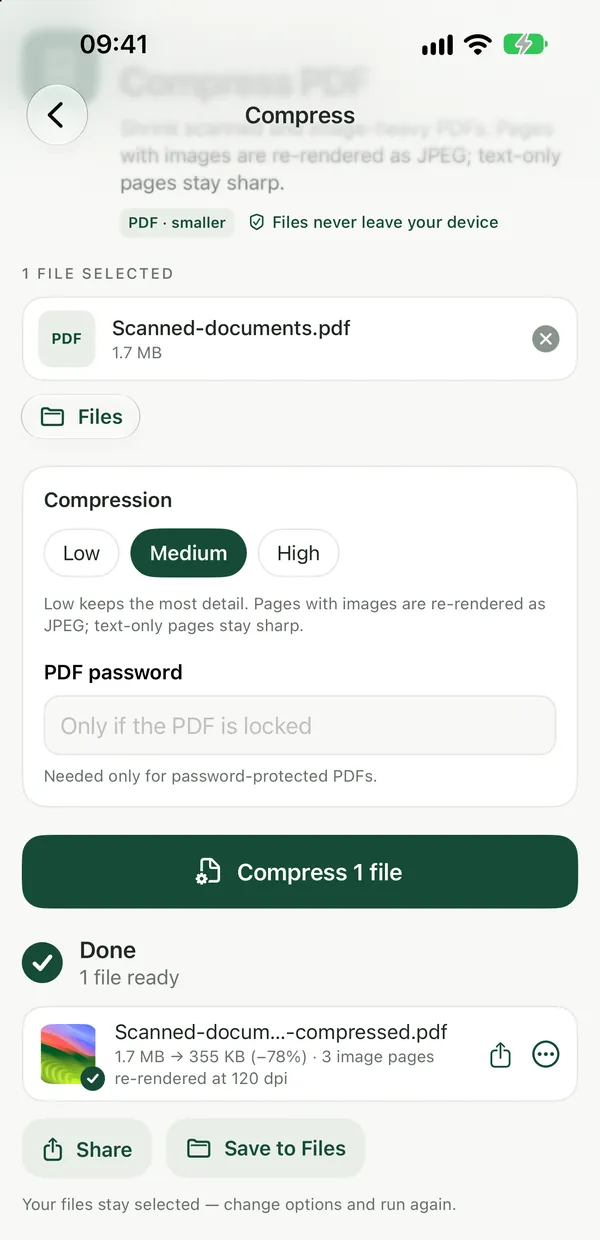
Compress PDFShrink scanned and image-heavy PDFs. Pages are re-rendered as images, so text is no longer selectable.Open tool- Open Compress PDF and drop your file.
- Choose a compression level and run it. Your browser does the work.
- Compare the new size with your target and download.
For a scan that stays readable after compression, read Compress a Scanned PDF Without Making the Text Unreadable.
Merge several PDFs in Merge PDF, reorder them, and download one file.
PDF to WordTurn a PDF into an editable Word document (.docx) with its text, headings and lists. Images and exact layout are not kept; scanned PDFs need OCR first.Open toolPDF to Word rebuilds text, headings and lists from a digital PDF as a .docx. It does not keep images or exact layout, and it cannot read scanned pages without OCR.
Which should you use?
- Private file, no limits, no account: Filevale.
- Need to edit PDF text or run OCR on a computer: Smallpdf Pro, or another editor.
- Everything on iPhone, offline: the Filevale app.
- Team with shared billing: Smallpdf Team.
More context: Private iLovePDF and Smallpdf Alternative and Filevale vs iLovePDF.
Sources
Checked in November 2026. Confirm current terms on the provider's site before deciding.
- Smallpdf pricing: plan names, feature lists, daily download limits, Pro features.
- Smallpdf Compress PDF: TLS, GDPR, ISO/IEC 27001, deletion after one hour, no sign-up for compression.
- Smallpdf privacy policy: retention for users with and without an account, mobile and desktop apps.
Frequently asked questions
Does Smallpdf upload my files?
Yes. It is an upload-based service. Its Compress PDF page says files are deleted automatically after one hour, and its privacy policy describes retention separately for signed-in and logged-out use. Filevale's web tools run in your browser and upload nothing.
Does Filevale have a daily limit like Smallpdf?
No. Filevale does not count downloads or tasks per day. Large files can still be limited by your device's memory.
Is Smallpdf safe for confidential documents?
It states TLS encryption, GDPR compliance and ISO/IEC 27001 certification, and deletes files on a schedule. Whether that is enough depends on your own or your employer's rules. If a document must not be sent to a third party, use a tool that processes it locally.
Can Filevale edit text in a PDF?
No. It can merge, split, rotate, crop, sign, stamp, watermark and compress, and convert PDF text to Word, but it does not edit the existing text in place. Smallpdf lists Edit Text under its Pro plan.
Does Filevale add watermarks or require sign-up?
No watermarks and no sign-up on any tool.