To unzip a TAR file, open it in a TAR extractor, pick the files you want and save them. You can do that in your browser on any device, with the tar command on a computer, or with the Mac's Finder. This guide shows all three, plus what to do with .tar.gz, .tgz and .tar.xz files.
What is a TAR file?
A TAR file bundles many files and folders into one file without compressing them. It is usually combined with compression: .tar.gz or .tgz uses gzip, .tar.bz2 uses bzip2 and .tar.xz uses XZ, which is smaller than gzip. "Unzipping" is not quite the right word, since a TAR is not a ZIP, but the job is the same: get the files out.
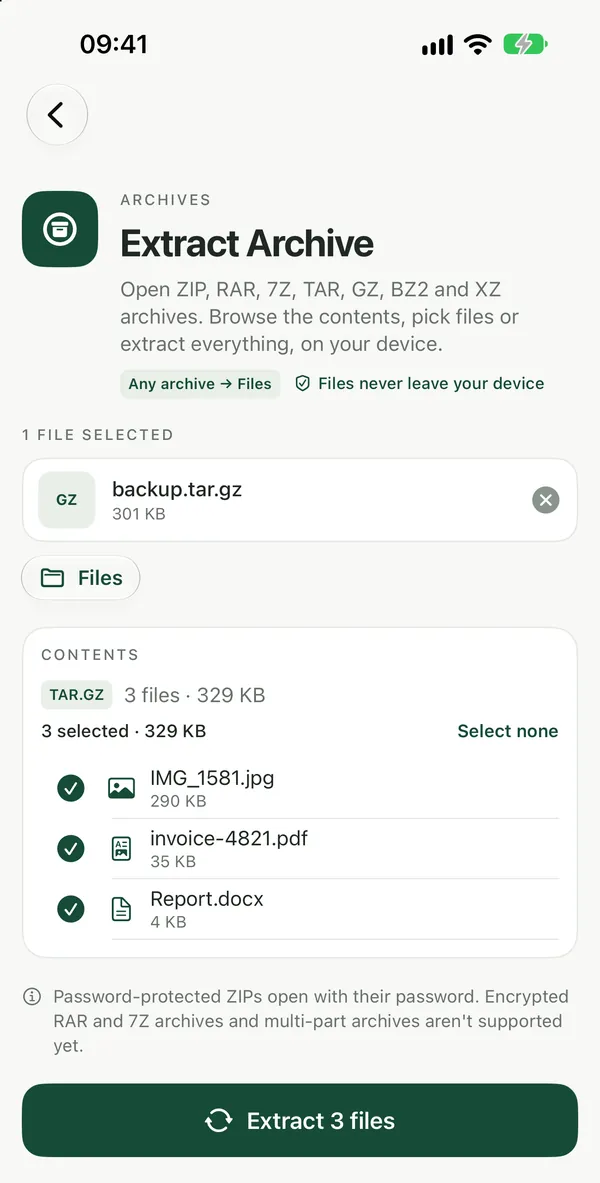
Unzip a TAR file in your browser
Extract TAR / TAR.GZUnpack .tar, .tar.gz, .tgz, .tar.bz2 and .tar.xz archives, or single .gz and .xz files, right in your browser. Browse the folders and pick files.Open tool- Open Extract TAR / TAR.GZ and drop your
.tar,.tar.gz,.tgz,.tar.bz2or.tar.xzfile on the page, or click to browse. - Click Open. The folders and files inside appear right away.
- Tick the files you want.
- Download them one by one, or all together as one ZIP.
The archive is read inside your browser, so your files are not uploaded. It works in Safari, Chrome, Edge or Firefox on iPhone, iPad, Android, Mac, Windows and Chromebook, with nothing to install. The tool is free with no watermarks, and no sign-up is needed to download.
Single compressed files work too. A plain .gz or .xz file holds just one file, and the tool unpacks it the same way.
Each extracted file has a Convert button that opens the right Filevale tool with the file already loaded, so you don't have to download and add it again.
Not sure what kind of archive you have?
Extract ArchiveOpen ZIP, RAR, 7Z, TAR, GZ and XZ archives in your browser, browse the folders, tick the files you want and extract them. No install, nothing uploaded.Open toolIf the file came without a clear extension, or you also have ZIP, RAR or 7Z files to open, use Extract Archive. It opens ZIP, RAR, 7Z, TAR with or without GZ, BZ2 or XZ compression, CPIO and ISO images. If an archive contains another archive, it is marked in the file list, and you can open it and browse it like a folder. For more on the other formats, see how to open RAR, 7Z and ZIP files.
Unzip a TAR file with the tar command
On Mac, Linux and Windows 10 or 11, the tar command is already installed. Open Terminal (or Command Prompt on Windows), go to the folder that has the archive, and run:
tar -xf archive.tarto unpack a plain TAR filetar -xzf archive.tar.gzto unpack a.tar.gzor.tgzfiletar -xf archive.tar.xzto unpack a.tar.xzfiletar -tf archive.tarto list what is inside without unpacking it
The command is fast for large archives, but you need to type the file name exactly.
Unzip a TAR file on a Mac without the command line
On a Mac, double-click a .tar or .tar.gz file in Finder. Archive Utility unpacks it into a folder next to the archive. This unpacks everything at once; to pick only a few files, the browser tool above is easier.
Unzip a TAR file on iPhone or Android
Phones don't come with a TAR extractor in their file managers. Open Extract TAR / TAR.GZ in Safari or Chrome, choose the file from Files or Downloads, and save the files you need back to your phone.
Make a TAR.GZ or ZIP to send back
To pack files the other way, Create TAR.GZ bundles any files into a .tar.gz in your browser, which is what Linux servers and many developer tools expect. If the person you're sending to uses Windows or a phone, a ZIP from Create ZIP is easier for them to open. The guide on how to tar and gzip files has the details.
Frequently asked questions
What is the difference between TAR and TAR.GZ?
A TAR file only bundles files together, so it is about as large as the files inside. A TAR.GZ file is that same bundle compressed with gzip, so it is smaller. Extract TAR / TAR.GZ opens both, as well as .tgz, .tar.bz2 and .tar.xz.
Can I take out just one file from a big TAR archive?
Yes. In the browser tool you see the folder tree as soon as you click Open, so you can tick only the file you need and download it. With the command line, list the contents with tar -tf first, then add the file's path after the archive name when you unpack it.
Why does Windows say it can't open my .tar.gz file?
Older versions of Windows can't open TAR archives in File Explorer, even though the tar command is included in Command Prompt. If you'd rather not use the command line, open the file in Extract TAR / TAR.GZ in Edge or Chrome instead, with nothing to install.