To convert a PDF to JPG on iPhone, open Filevale's free PDF to JPG tool in Safari, add the PDF, and save the images: every page becomes its own JPG, delivered as one ZIP for multi-page files. A screenshot works for a single page in a hurry, but it captures your screen, not the page, and the result shows it.
People need PDF pages as images for Instagram posts, WhatsApp, slides, or upload forms that only accept JPG. Here is the quick way, the proper way, and when to choose PNG instead.
Why screenshots aren't a good PDF to JPG converter
A screenshot of an open PDF is limited to your screen's resolution and aspect ratio. A portrait A4 page fills only part of the frame, so you crop, and small text loses detail when you zoom in afterwards. You also get the status bar, rounded corners to trim, and one page at a time. For a 12-page menu or a slide deck it's tedious and the images are uneven.
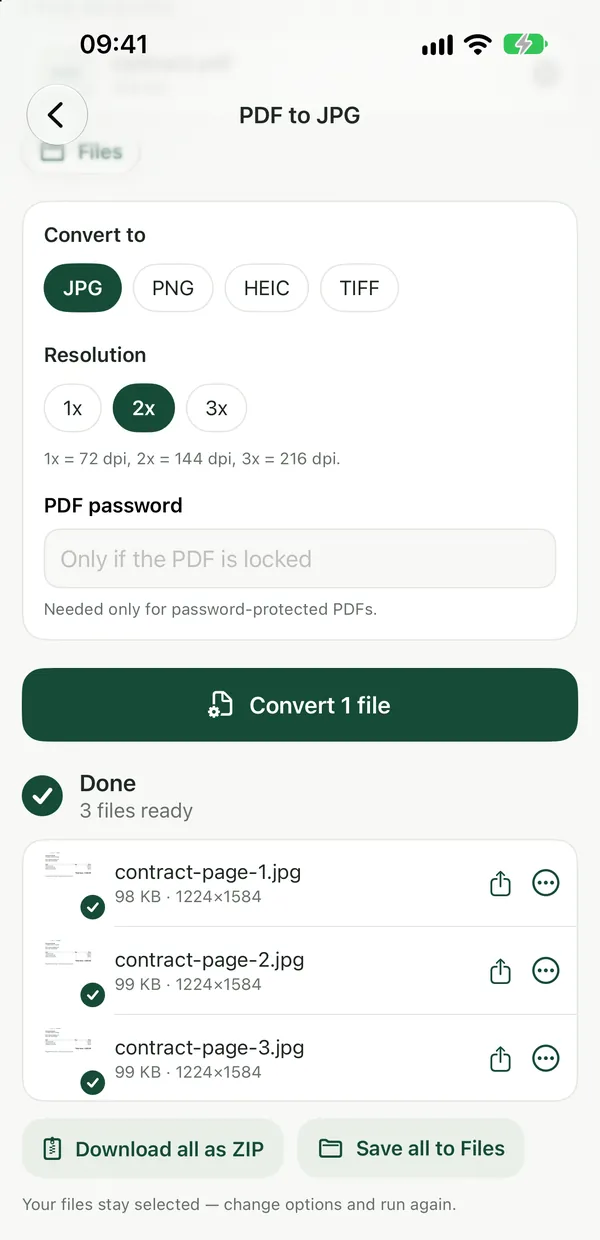
Convert every page to JPG in Safari
PDF to JPGTurn every page of a PDF into a sharp JPG image (144 dpi), downloaded as one ZIP for multi-page files. Private, right in your browser.Open tool- Open PDF to JPG in Safari and tap the drop area, then Browse to choose the PDF from Files or a download.
- Tap Convert. Each page is rendered as a sharp JPG at 144 dpi.
- For one page, save the image. For several, save the ZIP to Files and tap it to expand it into a folder of numbered JPGs.
- To get them into Photos, select the images in Files, tap Share and choose Save Images.
The conversion runs inside Safari, so the PDF is never uploaded. If you only need some pages, cut them out first with Extract PDF Pages and convert the smaller file.
If you convert PDFs often, the free Filevale iPhone app turns PDF pages into images on-device, right from the share sheet.
When to choose PNG instead of JPG
PDF to PNGConvert each PDF page to a crisp, lossless PNG image, ideal for slides and screenshots. Runs in your browser, documents never uploaded.Open toolJPG is ideal for pages that are mostly photos: smaller files that every app accepts. Pages that are mostly text, diagrams or line art look crisper as PNG, which is lossless, so there's no faint blur around letters. The trade-off is file size. Our guide to converting PDF to PNG without losing quality goes deeper into resolution and sharpness.
A worked example: a restaurant menu for Instagram
A cafe has a four-page PDF menu and wants a carousel post. Convert it with PDF to JPG, save the ZIP to Files, open it, select all four images and use Save Images to put them in Photos. Instagram accepts them as a carousel straight away. For a menu that is mostly text on a plain background, try PNG too and compare: the lettering is usually cleaner, and the file size difference rarely matters for a handful of images.
If the result is too large or too small
Images of full pages at 144 dpi are a good balance for phones and social media. If a website caps the upload size, Reduce File Size shrinks the JPGs. If you're going the other way and need to turn photos back into a PDF, see how to combine multiple JPGs into one PDF.
Frequently asked questions
How do I save a PDF page as a picture on iPhone?
Open Filevale's PDF to JPG in Safari, add the PDF and tap Convert. Each page becomes a JPG you can save to Files, then share to Photos with Save Images. A screenshot also works, but it's limited to your screen resolution and needs cropping, so small text ends up less sharp.
Can I convert a multi-page PDF to JPG on iPhone?
Yes. PDF to JPG renders every page as its own image and delivers them as one ZIP. Tap the ZIP in the Files app to expand it into a folder of numbered JPGs, then select them all and save them to Photos or share them in one go.
Is PDF to JPG or PDF to PNG better?
Choose JPG for pages with photos, or when you need small files that every app accepts. Choose PNG for text-heavy pages, charts and diagrams, because it's lossless and keeps edges crisp. PNG files are larger, which matters only when an upload form has a strict size limit.
Is my PDF uploaded when I convert it?
No. Filevale renders the pages inside Safari on your iPhone, so the PDF and the resulting images never leave your device. That makes it suitable for invoices, tickets and other documents you'd rather not send to an online converter's server.